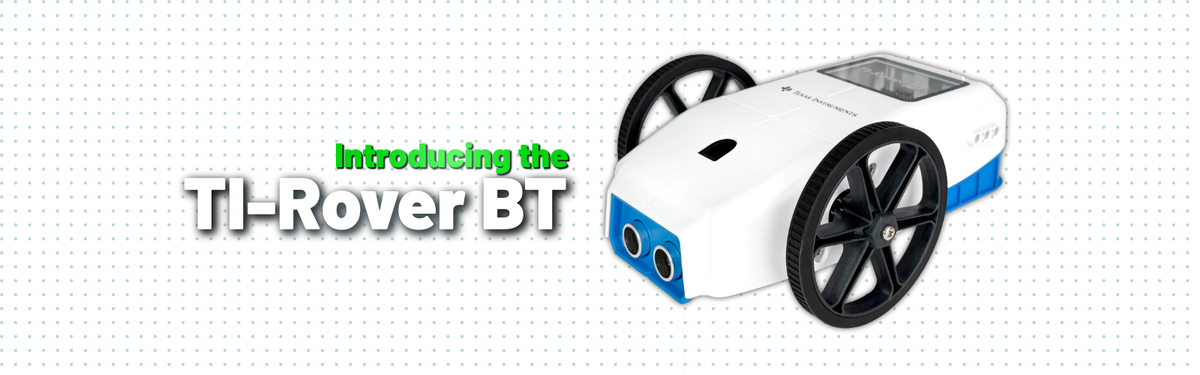
On October 22, 2026, Texas Instruments announced the TI-Rover BT, a Bluetooth-enabled robot that students control wirelessly from the TI-84 Evo graphing calculator. TI says it turns the classroom floor into a "living coordinate plane," converting algebraic equations into physical motion students can watch, trace and measure. In the words of Laura Chambers, president of TI Educational Technology, "The TI-Rover BT is more than a tool; it's a way to make abstract mathematical ideas tangible." Here's everything you need to know about it.
What is the TI-Rover BT?
TI calls the Rover BT "the robotic vehicle for math and STEM learning," and the idea is simple. Students write Python on their calculator (like the Ti-84 Evo Graphing Calculator), and the Rover drives, draws and measures in the real world.
That turns abstract math into something students can see. A slope becomes a line the Rover draws across chart paper. A parabola, a sine curve or an ellipse becomes a path students can watch, measure and check against their equations.
It's built for middle school and high school math, physical science and intro computer science classrooms, and for any teacher who wants coding and hands-on STEM to happen right on the calculator students already use.
What's new: TI-Rover BT vs. the original TI-Innovator Rover
The biggest change is the connection. The original TI-Innovator Rover carries a TI-Innovator Hub in a bay and the calculator clamps on top. The TI-Rover BT drops all of that: a small TI Bluetooth Adapter plugs into the calculator, and students send programs to the Rover wirelessly.

| TI-Rover BT | TI-Innovator Rover | |
| Connection | Wireless, via TI Bluetooth Adapter on the calculator | TI-Innovator Hub in the Rover; calculator attached on top |
| Calculators | TI-84 Evo (OS 7.1+); TI-Nspire CX II and CX II CAS support planned for 2027 | TI-84 Plus CE, TI-Nspire CX, TI-Nspire CX CAS |
| Sensors | Front-mounted ultrasonic ranger | Front ranger, bottom color sensor, gyroscope |
| Drive | Two stepper motors | Two motors with high-resolution encoders |
| Construction | Plastic | Aluminum |
| Charging | USB-C | Mini USB |
Key features and hardware
TI highlights four features that make the Rover BT a math tool, not just a toy robot:
- Wireless connection. Programs travel from the TI-84 Evo to the Rover through the TI Bluetooth Adapter. No hub, no cables, no calculator riding on top.
- Pen-up / pen-down. A built-in marker holder lifts and lowers on command, so the Rover can draw broken lines, separate shapes and labeled graphs.
- Precise movement. Each wheel has its own stepper motor, so the Rover can trace accurate lines, curves and shapes.
- Variable speed. A wide range of speed and acceleration settings lets students explore rate, distance and time in physical science.
On board, students will find:
- Two drive wheels, each with an independent stepper motor
- A front-mounted ultrasonic ranger for measuring distance to obstacles
- A marker holder that takes a fine or ultra-fine dry-erase marker
- An RGB LED students can set to any color in code
- Two Grove I/O ports for adding SEEED Studio Grove sensors and devices
- Attachment points compatible with popular block and stick building systems
- A USB-C port for charging and firmware updates
- A rechargeable battery that lasts about one full school day of typical use
The precision motors let the Rover navigate mazes or draw on chart paper and dry-erase surfaces.
Which calculators work with it, and how students code it
The TI-Rover BT works with the TI-84 Evo graphing calculator running OS 7.1 or higher. TI lists the TI-Nspire CX II and TI-Nspire CX II CAS as "coming soon."
Students program the Rover in Python, right on the calculator. Every program starts with one line that loads the Rover's command library:
import ti_rover_bt as rv
From there, students pick commands from four menus in the calculator's Python editor:
-
Drive — basic movement:
forward(),backward(),left(),right(),to_xy(),to_polar(), plus speed and acceleration settings - Math Drive — the Rover's signature feature: it drives graphs and shapes directly, including
drive_line(m,b),drive_parabola(a,b,c),drive_cubic(),drive_sin(),drive_cos(),drive_circle()anddrive_ellipse() - I/O — the RGB LED, the ranger (which reports distance in meters), battery level and the Grove ports
-
Commands — general tools like
sleep()and on-screen display
Here's a simple example that draws a square and turns the light green when it's done:
import ti_rover_bt as rv
rv.pen_down()
for i in range(4):
  rv.forward(1)
  rv.left(90)
rv.pen_up()
rv.color_rgb(0,255,0)
Because commands like drive_line(m,b) take the same slope and intercept students write in class, the code reads like the math.
Using the TI-Rover BT in the classroom
The Rover BT shines wherever students need to see math move. A few ways teachers can put it to work:
| Topic | What Students Do | Commands they'll use |
| Linear functions | Predict a line from y = mx + b, then have the Rover draw it on a grid |
|
| Quadratics and polynomials | Change a, b and c and watch the curve shift, stretch and flip |
|
| Trigonometry | Draw sine and cosine waves and compare amplitude and period |
|
| Geometry and conics | Draw polygons, circles and ellipses; check radius and center on paper |
|
| Coordinates | Drive to points in rectangular and polar form |
|
| Physical science | Explore distance, rate and time by changing speed and acceleration |
|
| Coding and engineering | Program obstacle detection or solve a maze using distance readings |
|
TI also offers classroom activities, guidebooks and a full online TI-Rover BT eGuide with every command, so teachers don't have to build lessons from scratch.
Getting started
The TI-Rover BT ships in a TI-branded kraft box.

Open the lid and you'll find the printed inserts sitting on top of the foam.

The top foam layer holds the cables, with the Rover's wheels showing through the cutouts.

Under it, the Rover sits in a plastic bag next to the TI Bluetooth Adapter.

Here's what comes in the box:

- 1 TI-Rover BT
- 1 TI Bluetooth Adapter
- 1 USB-mini to micro USB cable, for connecting the Bluetooth Adapter
- 1 USB-mini to USB-C adapter, which plugs into the TI-84 Evo's USB-C port
- 1 USB-A to USB-C cable (24"), for charging the Rover and installing updates
A marker / pen is not included.
To get rolling:
- Charge the Rover with the included USB-C cable. The LED glows orange while charging and turns green when full. A charge from nearly empty takes a few hours.
- Load the pairing file. Download the CFGRVRBT configuration file from education.ti.com/roverbt and send it to the calculator with TI's free connectivity app at connectevo.ti.com.
- Plug the TI Bluetooth Adapter into the calculator's USB port using the included adapter.
- Turn on the calculator and the Rover.
- Pair them. In Python, run CFGRVRBT and follow the prompts to choose your Rover. Then quit the program.
- Start coding. Create a new Python program and make the first line import ti_rover_bt as rv.
- Snap in a marker until it clicks into the holder, and start drawing.
If the two won't pair, check the lights. A flashing white LED on the Rover and a solid white LED on the adapter mean both are ready. A colored light means that device is already paired and needs to be disconnected first.
Final thoughts
The TI-Rover BT keeps the core idea of the original TI-Innovator Rover, a robot that makes math visible, and makes it simpler to set up. With no hub and no calculator riding on top, students write Python on their TI-84 Evo and watch their equations become lines, curves and shapes they can trace and measure. For schools adopting the TI-84 Evo, it's an easy way to bring coding, robotics and physical science into everyday math lessons.