A Warm Welcome
Underwood Distributing Co prides itself in carrying the brands of calculators that teachers and students can count on. As part of our mission to bring a complete selection of stellar products to the education industry, we're proud to bring on NumWorks and the NumWorks Graphing Calculator to our catalog.
Since you may not be familiar with the NumWorks Graphing Calculator, primarily due to its popularity in Europe, we thought that we could break the ice and introduce you to our new friend with a little bit of background knowledge.
A Brief History of NumWorks
Founded in 2016 by a former Apple software engineer, NumWorks aimed create an exceptionally modern and user-friendly calculator with open-source elements, appealing to students raised on technology. The first model, N0100, launched on August 29, 2017, in Europe and the United States, introducing Python programming to graphing calculators—a first in the industry. Subsequent models have been released over the past several years (N0110, N0120, N0115), and each have enhanced performance and additional features, with ongoing software updates keeping the device relevant for classroom use.

Features of the NumWorks Graphing Calculator
The NumWorks calculator is tailored for middle school and high school curricula.
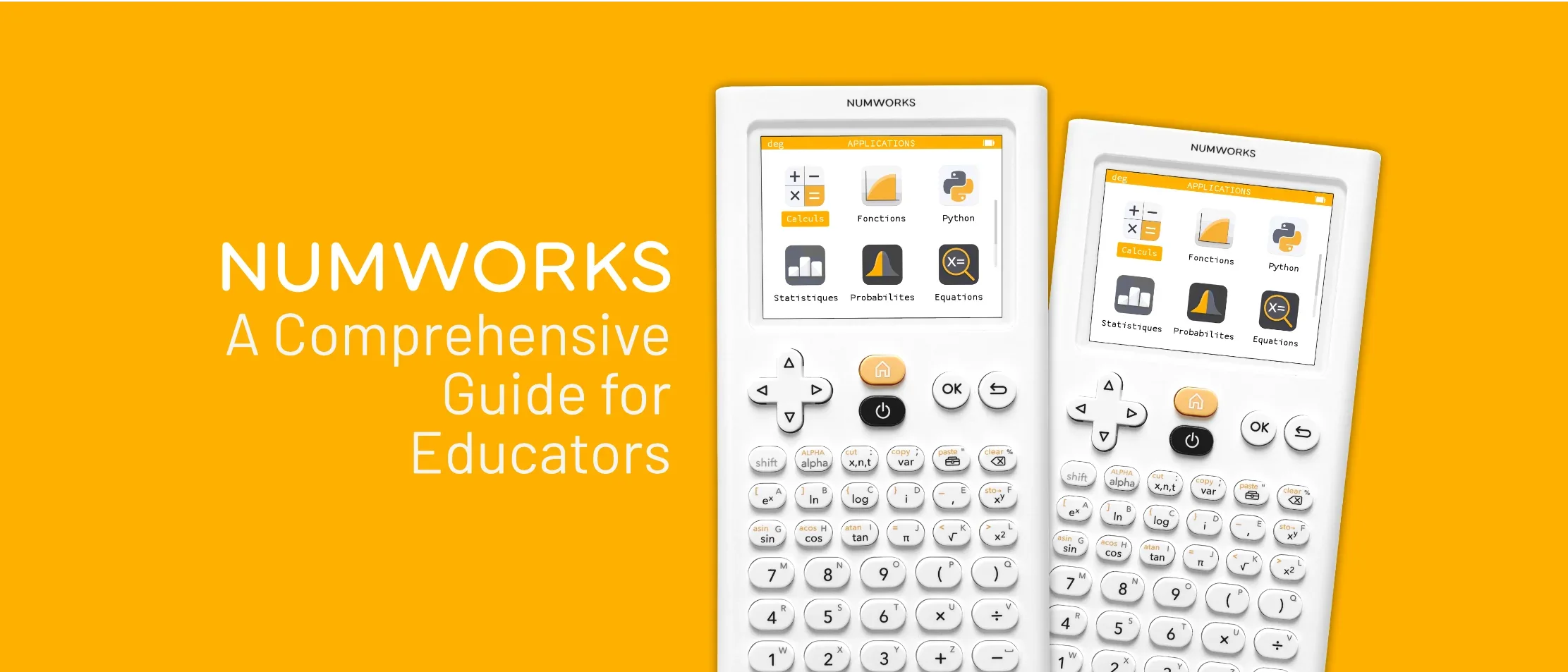
The 2.8" (measured diagonally) screen is not only backlit, but its in full color as well. On the screen, you'll notice a suite of application icons that look suspiciously resemble a phone screen. Here are some off the Apps that come "pre-loaded" onto the NumWorks Graphing Calculator:

Calculation App: Supports arithmetic operations, complex numbers, matrices, trigonometry, and unit conversions, with results displayed in exact or approximate forms.

Grapher App: Graphs up to four functions simultaneously in distinct colors, with tools to calculate intercepts, minimums, maximums, and zeros, enabling dynamic visualization of mathematical relationships.

Equations App: Solves linear and polynomial equations, supporting systems of equations and numerical approximations, ideal for algebra and precalculus lessons.

Statistics App: Provides summary statistics, visualizations, and data analysis tools for classroom experiments.

Regression App: Enables scatterplot creation and model fitting for data analysis on NumWorks Graphing Calculator.

Sequences App: Handles recursive and explicit sequences, with options to create scatterplots and link sequences.

Distributions App: Calculates probabilities for discrete and continuous distributions, such as normal and binomial, supporting probability and statistics courses.

Inference App: Conducts hypothesis tests and confidence intervals, enabling students to perform statistical inference for real-world data analysis.

Finance App: Handles financial calculations, such as compound interest, annuities, and amortization, preparing students for business and economics applications.

Elements App: Provides an interactive periodic table, displaying element properties like atomic mass and electronegativity, enhancing chemistry education.

Python App: Supports MicroPython programming, allowing students to write scripts for applications like fractals or games, fostering computational thinking.

Settings App: Customizes language, angle measure, and display preferences, supporting multiple languages including English, French, and Spanish.
It supports graphing up to four functions, statistical analysis, and Python programming, fostering computational thinking. Its limited Computer Algebra System (CAS) provides exact answers, a feature not found in many competitors.
Exam Acceptance
The NumWorks Graphing Calculator is approved for the SAT, ACT, and AP, and IB Diploma Programme exams. The calculator is also approved for some state exams. Please check the Exam Compliance site for more details about individual state approvals.
Physical Characteristics
Size
The calculator is about 6.3 inches by 3.2 inches. From the photos, it looks thin, because it is thin. How thin? 0.4 inches. Pretty impressive. For reference, here is a comparison between the NumWorks graphing calculator and 2 of the most popular graphing calculators on the market. The NumWorks calculator is the thinnest and smallest of the calculators.

Screen
The NumWorks graphing calculator has a 2.8" (diagonal) screen with a resolution of 320x240 pixels. These are the exact specifications of the Ti-84 Plus CE. The NumWorks calculator has thinner bezels around the screen when compared to the Ti-84 Plus CE.
Keyboard
The keyboard of the NumWorks calculator is split into three "thematic" zones.
The first group of keys are used for navigation. This includes the arrow buttons to move around the screen, the home button to return to the main screen, the power button to turn the calculator on and off, the "OK" button to confirm selections, and the return button to back out of menus/screens without returning all the way home.

The second group of keys are used for advanced functions. Many of these buttons are familiar and typical of a graphing calculator. A unique button found on the NumWorks calculator is the "toolbox" button (highlighted in blue) which can be used to access additional menus and options while in any application. The shift key allows access to the additional functions found on the top left and in yellow of the advanced function keys. The alpha key allows access to additional letters and symbols found on the top right in gray of advanced function and numerical keys.

The third group of keys are basic functions and numbers. The scientific notation button can be found here along with the decimal point and answer recall button ("Ans"). Both the "EXE" button at the bottom right and the "OK" button at the top can be used as an enter key.

Slide Cover
The NumWorks graphing calculator includes a white, protective cover. The cover fits over the front for protection and the back for storage during use. The cover can be slid over the calculator or popped in. The full, symmetrical design of the cover means no worrying over the orientation of the cover.

Another cool feature is that the cover can slide onto the calculator both from the top of the calculator, and from the bottom. This also works when attaching the cover to the backside of the calculator as well!

Reset Button
If you need to reset the calculator, two options are available. The first is a physical reset button found on the back of the calculator. It is located in the center of the back and labeled clearly as "RESET" for easy identification. You should press this button with a small pin or needle-point pen. Please refrain from using a pencil as the lead can break and result in the button getting stuck in the pressed position. Alternatively, you can head to the Settings application, scroll to the bottom and select the "Reset the calculator" button. You'll need to confirm you would like to perform a full reset and delete all data to complete the process.


Charging and Data-Transfer
The NumWorks graphing calculator is charged via a USB-C port in the bottom of the calculator. This is a familiar location for most users as it's the same as most smartphones.

You can connect the calculator to a computer via the USB-C cable and update the calculator, as well as upload new applications and files. To update your NumWorks calculator to the latest available software version, you'll need to connect the calculator to a computer and visit the Update site on the NumWorks page in any web browser.

As everyone may not have a USB-C cable laying around, NumWorks includes one in the box for you. It's easy to find as well due to its bright yellow-orange color and is a standard 24 inches, or 2 feet, long.

Test Mode
Like many graphing calculators, the NumWorks graphing calculator features a test mode for educators and exam proctors to keep exams fair and ensure compliance. To access test mode, visit the settings applications and scroll down to the "Test mode" option. You'll see two options: Exam mode and Press-to-test.


Exam mode has presets for various exams including STAAR, PA, SC, NC, and IB exams. In Press-to-test mode, you can toggle off specific features if the exam is not one of the prelisted ones or if you have unique needs.


After you've selected the exam mode you wish to activate, you'll need to confirm the selection for the necessary changes and deactivations to take place. The top of the screen will now display the name of the exam mode for confirmation.

To deactivate exam mode, you'll need to plug the calculator into a computer and confirm the exit.

How much does a single NumWorks calculator cost?
A single NumWorks graphing calculator sells for $99.99.
Why Underwood Distributing is bringing NumWorks calculators on board?
At Underwood Distributing, our mission is to offer our customers brands that manufacture safe, reliable, and innovative products that educators across the USA can count on.
After evaluating the NumWorks Graphing Calculator, we believe it is a worthy contender of your attention.
Additional Questions and Resources
You probably have a bunch of questions just like we did. That's why we asked a bunch of the hard questions for you!
Will the NumWorks Graphing Calculator be able to last an entire school day on a single charge?
Yes.
How long does the calculator last on a full battery? How long does it take to charge?
The NumWorks calculator provides around 20 hours of continuous use on a single charge. It will take approximately 6 hours for the calculator to charge from 0 to 100%.
Does the NumWorks Graphing Calculator have a charging station?
Not yet! However, we do sell charging docks that can work with up to 10 NumWorks Graphing Calculators. Contact us for more info on this!

Is there a way to try the calculator before purchasing?
Yes! There is an available mobile application available on Android and iOS, along with an online emulator at https://www.numworks.com/simulator/. These resources are great for teachers looking to test out the functionality of the calculator before purchasing.
Are there available resources for educators and school administration?
Absolutely! Take a look at these resources for your classroom, teaching, and purchasing needs.
Are other teachers using this calculator?
Tons! And many of them are happily sharing their experiences. See a few blog posts from other teachers and consumers to feel confident in your purchase.
"Teacher Spotlight: Kevin from Virginia!" by Emma Shell
"I’ve really enjoyed using the NumWorks calculator. Teaching students Python in parallel with the traditional math content has significantly increased engagement and made differentiation a lot easier."
"Meet our new Math Teacher in Residence, Kristin!" by Nick Koberstein
"I want to tell teachers that I understand it can take some time to learn a new tool, especially with how busy your day is already! But once you do, it will be so worth it! NumWorks makes learning math so much more accessible! You no longer have to teach how to use the calculator and can focus on the math content. NumWorks is intuitive so students can use it with no frustrations. It’s a win, win!"
"Meet our new Math Teacher in Residence, Lia!" by Kirstin Czerwiec
"My favorite features of the calculator are the visuals and the vocabulary. I taught at Title 1 schools, so many of my students were English learners or English was not their first language. Pairing the math symbols with the vocabulary is so beneficial for language acquisition, especially when it’s connected to easily accessible visuals. The Statistics and Grapher apps are particularly impressive for this."
Still have questions or concerns? Ready to purchase? Reach out to us today! We're happy to help in any way we can. You can reach us via email (hello@underwooddist.com) or phone (800-753-3570).